Image Comparison Slider
Customizable Website Component
2025
CHALLENGE
Use Rive to create an image comparison slider that can be integrated into any website builder with a user's custom settings and images.
Concept
During a chat with my VFX instructor, he expressed that it was always a challenge for his students to incorporate a classic image comparison slider for their VFX case studies, because not all website builders have a native solution for such a tool. With my growing expertise in Rive, I took this as a challenge to create a "Rive MOGRT" of sorts: a Rive file that anyone could modify to their liking, thus offering an image comparison slider template with an unusually high degree of customization compared to most website tools.

After getting a feel for how most online sliders like this behave, I went straight into Rive to start making a basic prototype of this tool.
Rive File Setup
I heavily utilized Rive's Data Binding to create all the functionality this tool would need. My goal was to offer as much customization as I could cram in the very little time I had for this project. This tool needed to not only accept any images of any dimensions, but also feature a slider with a whole set of customizable settings.

I separated my inputs into two view models: one for the controls that the user would manipulate (VM_CTRLS), and one that was just for the backend functionality that the user did not need to interact with (VM_NON-CTRLS). The second view model's inputs communicate with the inputs from the first view model in order to carry out the user's customizations in a variety of ways that affect the file. For instance, if the user changes the height of the canvas, this affects not only that, but also the slider line's stroke width, the knob's size, and the corner text labels' size as well. Numeric converters also help with mathematical operations that constrain certain elements to specific limits so that nothing scales too much or too little when the artboard's height changes.

For the image importing system, I relied on Rive's own native way of replacing an image that already exits within the file. Since my file includes two placeholder images, the user only needs to replace those with whichever images they want to use from their device. With the way Rive handles this feature, the new image automatically inherits any properties the old image had in the file, such as position and scaling. I set these details up in advance with the placeholder images so that the user would not have to mess with the actual image layers in the hierarchy themselves. Part of the preserved properties are also whatever Data Binding settings the old images had, so the user does not need to relink the inputs to the new images either. They simply upload the images, change the Data Binding inputs in VM_CTRLS to their liking, and export the file once they're done!
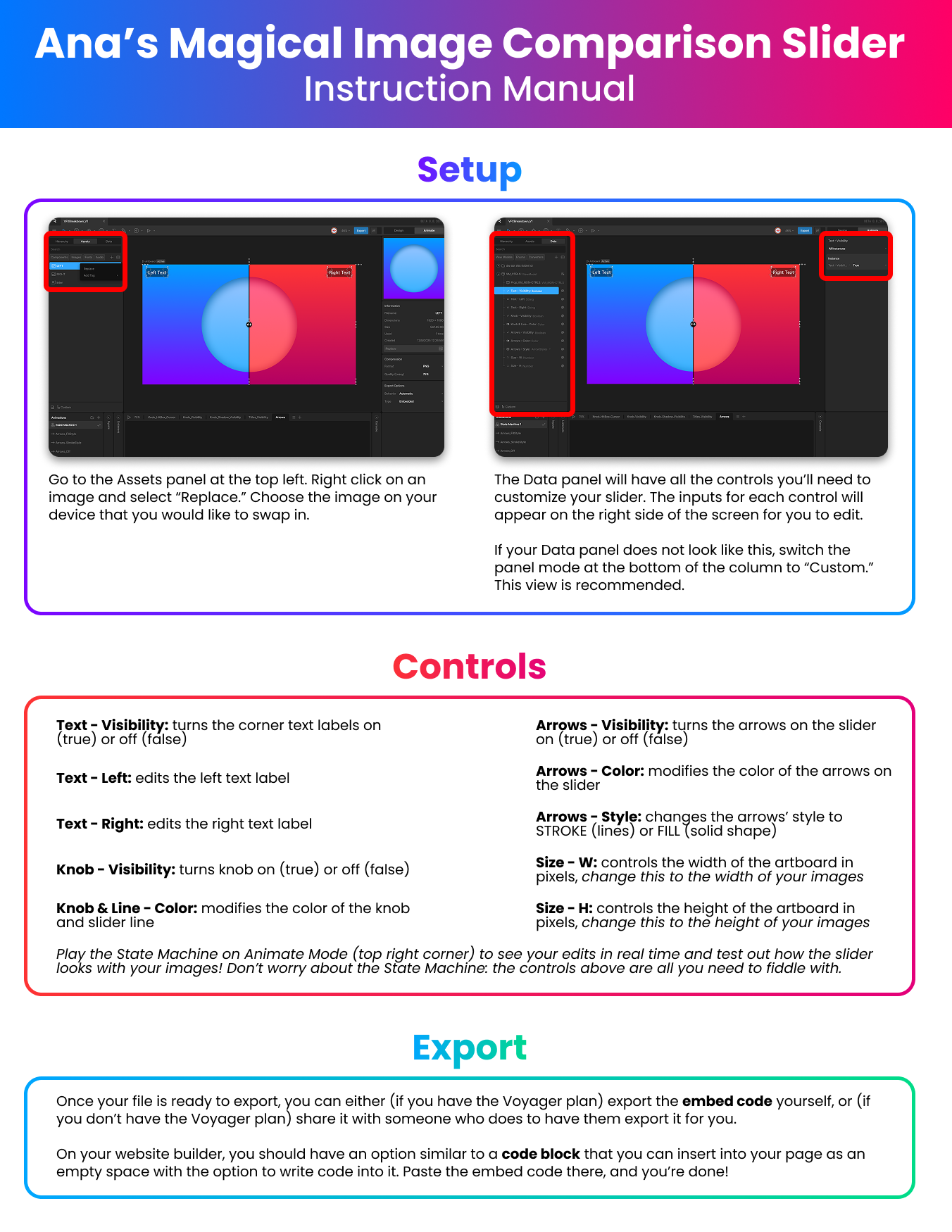
Instruction Manual
In order to make sure any user is able to utilize this tool without being too confused by the file's interface, regardless of their experience (or lack thereof) with Rive, I made a simple one-page instruction manual to accompany the file itself. This manual goes over the recommended Data panel view that the user should have, the list of "controls" (inputs in the VM_CTRLS view model) that they can manipulate, and a simple note about exporting the file as an embed code and inserting it into their website builder.

Trying to write instructions for how the embed code should be inserted into the website was a bit of a challenge. I worked under the assumption that most (if not all) common website builders nowadays have a feature similar to Webflow's "Code Embed" page element, but I was unaware of what it would be called in every single builder, so I went for a description of what it's supposed to do and what to do with it.
Future Considerations
Something I really wish I would've been able to do for this short project was to figure out a way to allow the user to manipulate the inputs in VM_CTRLS without ever having to touch the Rive Editor itself or have a paid account to be able to export the embed code. I wanted this slider to have the same ease and functionality of a MOGRT: a simple file that anyone down the pipeline can edit without messing with the original project file in which the MOGRT was created.

The biggest bulk of my time working on this slider was the failed attempts at coming up with some process or tool that could do this. I'm extremely unknowledgeable about writing scripts in general, so it definitely didn't help that I couldn't just code my way into an easy copypaste solution. I even turned to Bolt.new, a vibe coding platform, to see if it could generate a tool that parsed Rive files on its own, exposed any inputs, and exported an embed code that included the user's customizations, but I was completely unsuccessful with this approach.

In general, I'd love it if the Rive team introduced some kind of MOGRT-like solution for Rive files. The Rive Marketplace already allows users to "Remix" other peoples' files with their own changes, but these modifications still involve knowing how to use the Editor, and free accounts still would not be able to export an embed from it. If there ever comes a way to sell Rive files to absolutely anyone, through a platform that lets the buyer make their customizations to the file before exporting whatever format they need for their purposes, without ever even needing a Rive account... I would immediately sell this slider (or even a better updated version) on such a platform. I'm also still considering looking for a way to incorporate this functionality into my file on my own. In the meantime, I'll just be distributing this to any of my peers who have Rive accounts and are interested in using this for their websites.
Working Website Slider
check out my other work!